
Usage Ping
Exactly what Livebound's optional startup ping sends, when it exists, and what the published receiver does with it.
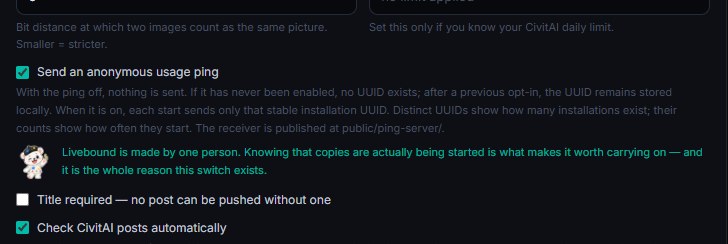
The usage ping is optional and off until you opt in. Its purpose is deliberately narrow: it lets the project count distinct Livebound installations that opted in and how often those installations start.
What Livebound sends
Livebound does not create an installation identifier before consent is given. On the first opt-in it creates one random UUID and keeps that identifier stable for the installation.
Opting in during First Start sends the first ping when setup finishes. On each later application start while the setting is enabled, Livebound sends exactly one JSON field:
{"id":"550e8400-e29b-41d4-a716-446655440000"}
The payload does not contain the Livebound version, operating system, CivitAI account, image-library information, prompts, posts, model names, or other application data.
The request runs in the background. A failed or unavailable ping endpoint does not block or change application startup.
Turning the setting off stops future pings. The existing local installation UUID is retained, so opting in again does not create a second installation identity.
What the receiver does
The receiver source is published with Livebound under ping-server/ in the public repository.
The receiver:
- accepts only
application/jsonrequests to/ping; - accepts only the single
idfield and requires it to be a well-formed UUID; - limits the request body to 1 KiB;
- forwards that UUID to the configured analytics endpoint as the installation identifier for a startup event;
- does not forward the client’s User-Agent, forwarding headers, or other request metadata into that analytics event;
- does not maintain an application access log;
- returns
204 No Contentafter the upstream event has been registered.
The published copy contains no deployment credentials or analytics destination. Those are supplied separately to the maintained receiver when it starts.
What a request shows regardless
Like every HTTP call, the ping shows the connection’s IP address at the transport layer — that is how a reply finds its way back, and no application can avoid it. The receiver does not record it, does not forward it into the analytics event, and keeps no access log; what a reverse proxy in front of it does is an operating decision that the published source cannot answer for. If that matters to you, the switch is the honest answer: with the ping off, nothing is sent; a UUID created by an earlier opt-in remains only in the local database.
Read it yourself
Both halves are in the public repository. Neither is long — the receiver is a single Go file of about two hundred lines, and the sender is shorter than this page.
| What | Where |
|---|---|
| What Livebound sends, and only when consent is on | backend/usage_ping.py |
| The address it sends to | backend/config.py — DEFAULT_USAGE_PING_URL |
| The receiver, in full | ping-server/main.go |
| Its tests, which state the behaviour as assertions | ping-server/main_test.go |
| The image it runs as | ping-server/Dockerfile |
The image published for this project is built from exactly those files, in this repository, so you can build it yourself and compare.
Why publish the receiver
The client-side sender is only half of a telemetry claim. Publishing the receiver makes the other half inspectable too: you can read what Livebound sends and what the receiving application forwards without relying on a privacy statement alone.